
AutoPilot
  • Forside
  • Produktet
    • Timeregistrering
    • Sagsstyring og planlægning
    • Fakturering
    • Analyse
    • Vækst
  • Proces
    • Uddannelse
      • Workshops
      • Mentor
  • Integrationer
    • e-conomic
    • Microsoft Dynamics Business Central
    • Navision
    • Faktura-Boks
  • Om os
    • Kontakt
  • Kundesider
    • Kundefordele
      • AutoPilot Dage
      • AutoPilot Lounge
      • Forretningsudvikling
      • Fjern- & hjemmearbejdspladser
      • Skift til hosting
      • Uddannelse
    • Support
      • Host driftsstatus
      • FAQ
      • Hotline
      • Manualer
      • Videovejledninger
      • Versionsnoter
      • Næste version
  • Click to open the search input field Click to open the search input field Search
  • Menu Menu
Blog - Latest News

Hvordan får jeg adgang til den hostede AutoPilot fra Mac?

06/04/2017/in Hosted AutoPilot/by admin
B

Hvordan får jeg adgang til den hostede AutoPilot fra Mac?

Installer Remote Desktop

Åbn Appstore. Find og installer nyeste version af Microsoft Remote Desktop. Hav kode til dit Apple ID parat når programmet skal installeres. Vælg “Keep in dock”.

Konfigurer Remote Desktop

Start Remote Desktop
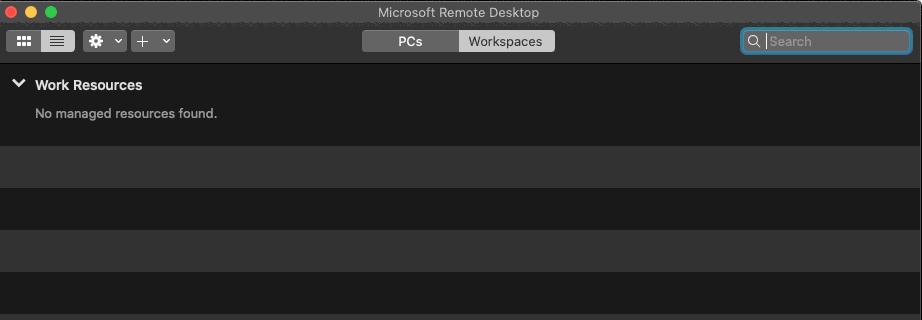


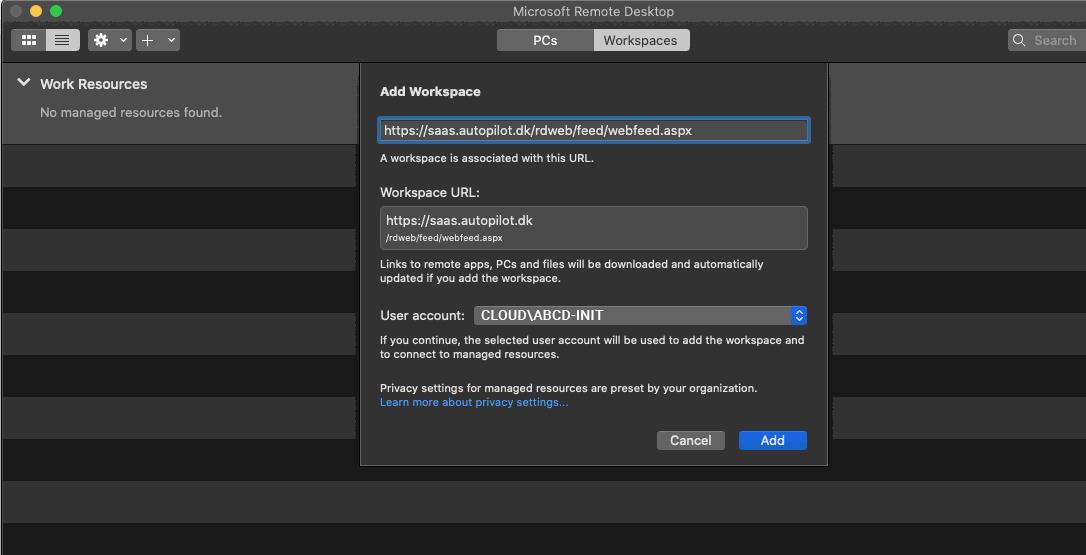
Klik + og Add Workspace
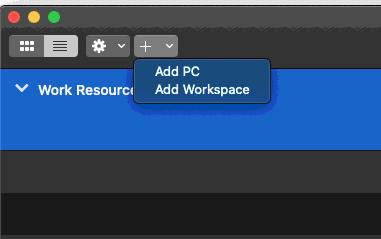


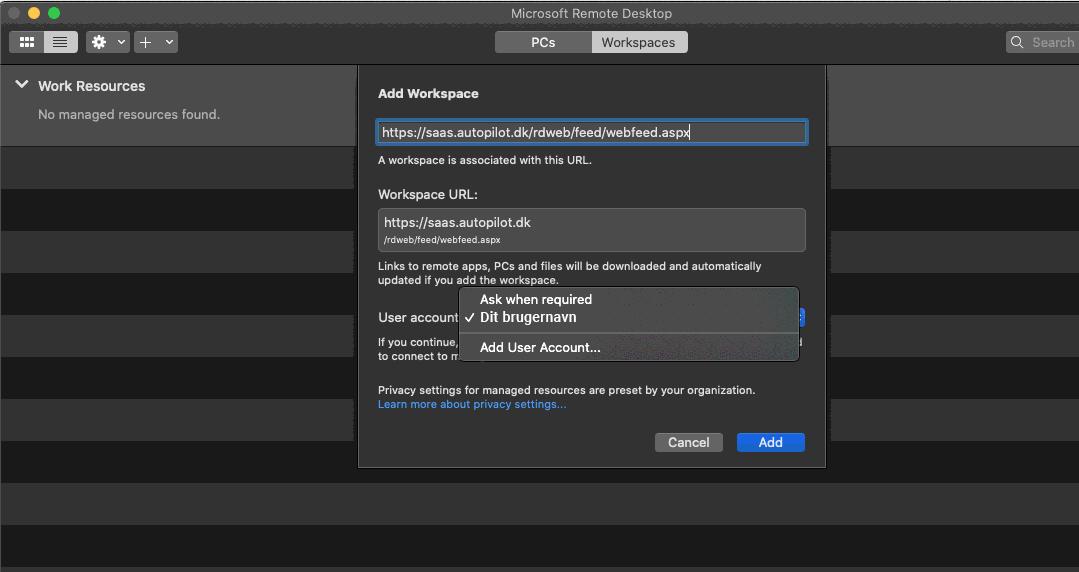
Indsæt denne URL i øverste felt: https://saas.autopilot.dk/rdweb/feed/webfeed.aspx

Ud for User account: Vælg Add User Account

Tryk Add, nederst til højre.
 

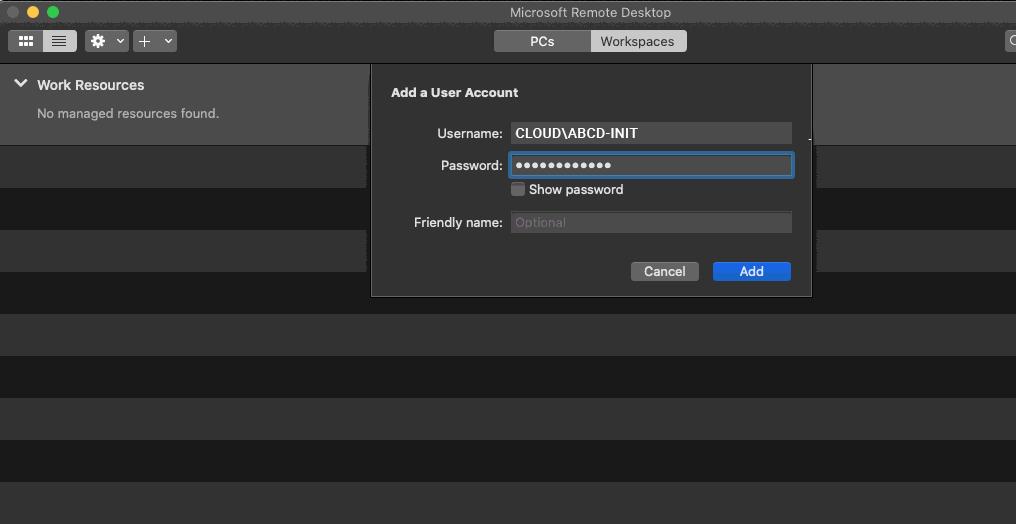
Udfyld med det brugernavn og kodeord du har modtaget på email:


User name: CLOUD\[dit brugernavn]

Password: [din kode]


Tryk Add.


Tryk Add.


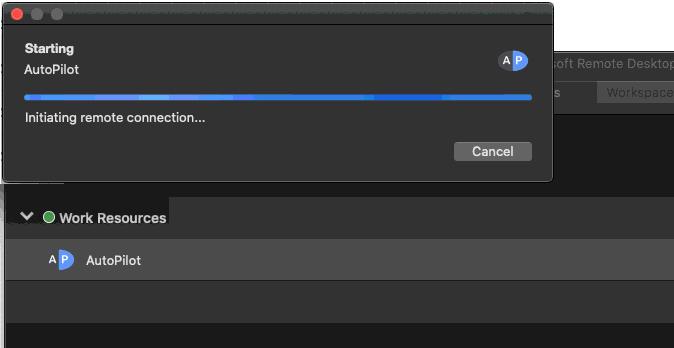
Nu kan du starte AutoPilot ved at dobbeltklikke under Work Resources > AutoPilot


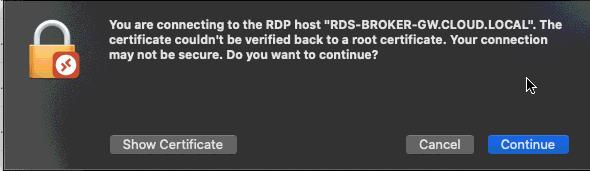
Continue
 

Nu har du oprettet en genvej til din AutoPilot. 


Om filer

AutoPilot producerer forskellige filer – pdf-bilag, linkfiler til finans, flettefiler med mere. For at bruge dem skal du kopiere dem fra den hostede løsning til din lokale maskine.

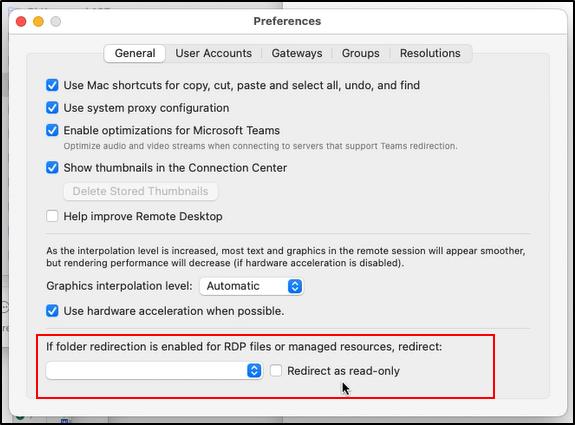
Din Mac tillader kun at filer kopieres fra den hostede folder, til fx. din Macs home-folder (“home on Korsgaards-Mini” herunder).

Når der eksporteres filer i AutoPilot, så skal disse gemmes ned i den folder.
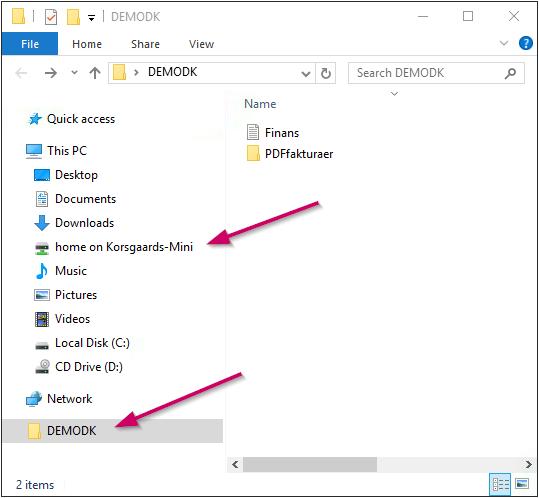
Hvis din Macs home-folder ikke er synlig i oversigten, eller du ønsker at ændre det til en anden placering, skal du gå i Microsoft Remote Desktop > Preferences:
Hvordan ændrer jeg sprog?

Serveren gætter som udgangspunkt på hvilket sprog dit styresystem taler. Dette gæt er ikke altid helt korrekt. For at ændre sprog vælges Indstil (på engelsk: Set) i programlinjen. I billedet vælges det ønskede sprog ud for “Formater”.

Direkte link
Posted on 06/04/2017
Del denne side
  • Share on Facebook
  • Share on X
  • Share on WhatsApp
  • Share on Pinterest
  • Share on LinkedIn
  • Share on Tumblr
  • Share on Reddit
  • Share by Mail
https://autopilot.dk/wp-content/uploads/2019/07/blank_logo_placeholder.gif 0 0 admin https://autopilot.dk/wp-content/uploads/2019/07/blank_logo_placeholder.gif admin2017-04-06 10:49:562023-01-25 14:12:10Hvordan får jeg adgang til den hostede AutoPilot fra Mac?
Recent
  • Årsreminder 2024/202517/12/2024 - 09:13
  • Se om du har restferie der skal bruges inden udgangen af...01/11/2023 - 10:59
  • Årsreminder 2023 – 202430/10/2023 - 13:52
  • Nyheder i din AutoPilot18/09/2023 - 10:55
Popular
  • Genvejstaster i AutoPilot24/04/2014 - 11:21
  • Ny kunde i Colombia22/09/2014 - 11:26
  • Velkommen til den skaldede kok30/09/2014 - 12:43
  • Stor succes med AutoPilot-Dage11/11/2014 - 10:22
Book demo
Få nyhedsbrevet
LinkedIn
Hotline
Kontakt os
Uddannelse

Sitet bruger cookies, se privatlivspolitik © AutoPilot ApS.

Alle priser er vejledende og angivet i DKK ex moms.

Link to: Opsætning af Webtimeseddel Link to: Opsætning af Webtimeseddel Opsætning af Webtimeseddel Link to: Hvordan tømmer jeg cachen (mobil enhed) Link to: Hvordan tømmer jeg cachen (mobil enhed) Hvordan tømmer jeg cachen (mobil enhed)
Scroll to top

Ved fortsat brug af sitet accepterer du vores brug af cookies og privatlivspolitik.

OKNej tak

Cookie and Privacy Settings


How we use cookies

We may request cookies to be set on your device. We use cookies to let us know when you visit our websites, how you interact with us, to enrich your user experience, and to customize your relationship with our website.

Click on the different category headings to find out more. You can also change some of your preferences. Note that blocking some types of cookies may impact your experience on our websites and the services we are able to offer.

Essential Website Cookies

These cookies are strictly necessary to provide you with services available through our website and to use some of its features.

Because these cookies are strictly necessary to deliver the website, refusing them will have impact how our site functions. You always can block or delete cookies by changing your browser settings and force blocking all cookies on this website. But this will always prompt you to accept/refuse cookies when revisiting our site.

We fully respect if you want to refuse cookies but to avoid asking you again and again kindly allow us to store a cookie for that. You are free to opt out any time or opt in for other cookies to get a better experience. If you refuse cookies we will remove all set cookies in our domain.

We provide you with a list of stored cookies on your computer in our domain so you can check what we stored. Due to security reasons we are not able to show or modify cookies from other domains. You can check these in your browser security settings.

Other external services

We also use different external services like Google Webfonts, Google Maps, and external Video providers. Since these providers may collect personal data like your IP address we allow you to block them here. Please be aware that this might heavily reduce the functionality and appearance of our site. Changes will take effect once you reload the page.

Google Webfont Settings:

Google Map Settings:

Google reCaptcha Settings:

Vimeo and Youtube video embeds:

Privacy Policy

You can read about our cookies and privacy settings in detail on our Privacy Policy Page.

Privatlivspolitik
Accept settingsHide notification only